
77% of existing advertisers on Google plan to increase their investment. This implies more competition and harder to generate sales. With over 68% of Google retail spend on shopping campaigns it’s clear to stand out you have to follow the Google shopping campaign best practice.
https://upbeatagency.com/google-ads-statistics/
This is not cookie-cutter best practices but actionable and one that improves results of your shopping campaigns on Google. From optimizing your product feed to leveraging smart bidding strategies, we’ll walk through actionable steps to help your products stand out, attract the right customers, and ultimately, improve your bottom line.
Google Shopping Campaign Best Practices
1. Bid Strategy – Shopping Campaign Best Practice 1
Unless you have tons of conversion data and the account has been active for a long, it is best to start with a manual bid strategy with CPC expectations from previous data or Google Keyword Planner Data
The primary goal here is to collect search term data and make decisions on segmenting the campaign into multiple ad groups, excluding bad search terms, and optimizing feed (most importantly)
2. Product Segmentation
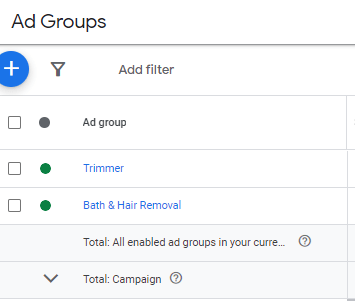
In a Shopping campaign, the following structures can be used to segment ad group
Segment by
- AOV
- Margins
- Best-sellers
- Volume
- Category
- Per product
We have found categories to work best when segmenting, but don’t make the mistake of having products with high variance in price grouped into the same campaign. You might lose on one of the categories and never know about it just because the other category in the same ad group is profitable
3. Pricing strategies
This is the third Google shopping campaign best practice, but the most important as Google ad buyers are more price-conscious than Facebook ad buyers
One of the critical differences between Google ads from Facebook is other competitor products are visible beside their prices. So the only way to command a higher price is to do non-paid media activity and build a brand.
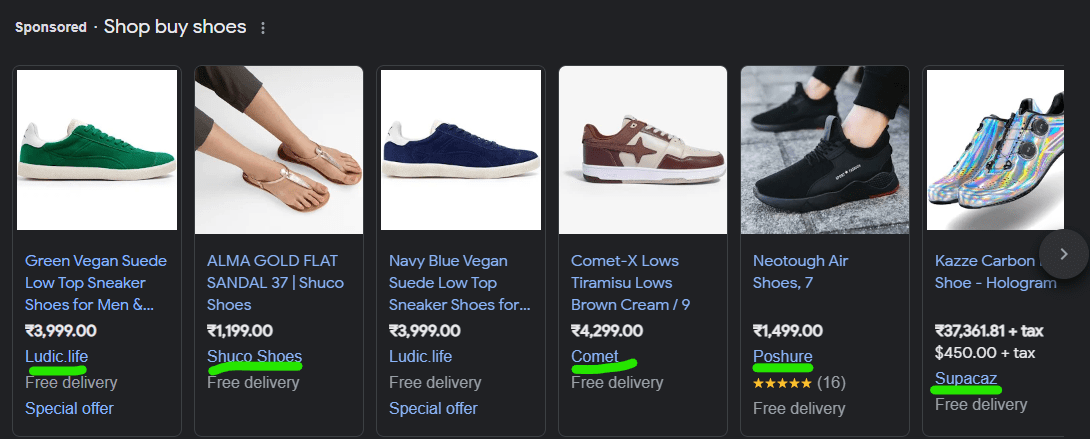
In every other case, your prices must be competitive and part with the average price of the product in the industry. To command a higher price find search terms with low volume and low competition but high intent because of limited options your product listing is highly likely to get a click
4. Negative keywords

Always add negative keywords in the Google shopping campaign during creation and not just while it’s active and collecting data. Create a negative keyword list of brand names and competitor names and apply to this campaign
Even in negative keywords, you can add as per 3 match types – broad, phrase, and exact. For totally irrelevant terms use broad keywords. Google ads has a sneaky way to show ads even though negative keywords are added, so use correct match types to eliminate all irrelevant keywords
5. Feed Optimization

This is the most important and hence kept at last. I have had several unprofitable campaigns take a 180 degree and turn fully profitable just because of constant improvement in shopping feed.
What are all the ways to improve Google Merchant Center Feed for Google Shopping Campaigns?
- Use the search terms data from shopping and search ads to add relevant keywords to title and description of the product
- Add main search keyword in the beginning of title and in first 100 words of the description
- Add other attributes related to products like size, color, gender, additional_image_link
- Product more information using custom_labels
- Use Google Keyword Planner to rank multiple SKU’s of same category on different search terms increasing the surface area for impressions and purchase
Effective Use of Product Categories and Types
Monitoring and Adjusting Campaigns
Experiment with Ad Extensions
Implement Seasonal Campaigns
Use High-Quality Images
Which one would you click?

The 2nd one right? because before reading the text the image in the ad has already formed an opinion in your mind, shoppers see the image first thing in a shopping ad.
These images are fetched from Google shopping feed which mostly is the first image on the website, so make sure your first image of product is unique and worthy of a click
The image attribute in shopping feed is image_link
So, what makes a good quality image in a shopping ad?
Images must be in a white background or a pastel color background that clearly contrasts with the product color and the product is clearly visible. A white background helps the product stand out and minimizes distractions, making the ad more effective.
Google recommends using images that are at least 800 x 800 pixels to ensure they look good on all devices.
Dos of good image in a shopping ad
- Good Lighting – Ensure the product is well-lit, with balanced lighting that highlights its features without creating harsh shadows or overexposure. Good lighting makes the product more appealing and easier to evaluate.
- Comprehensive View: Whenever possible, include images from multiple angles and show different variations (colors, sizes) of the product. This gives shoppers a better understanding of what they’re considering purchasing.
- No Overlay Text – Avoid using watermarks, logos, text, or other overlays on your images. Google prefers clean images that focus solely on the product.
- Use of Additional Images – While the main image should be straightforward and product-focused, upload additional images via additional_image_link attribute in Google to show the product in use or context.
Focus on Your Best Sellers
Use Smart Bidding Strategies
Enhance Product Titles
Optimize Location Settings
Leverage Customer Reviews
Conclusion